How to Speed Up a WordPress Website (Core Web Vitals Guide 2026)
By Imran Hosain · · 7 min read
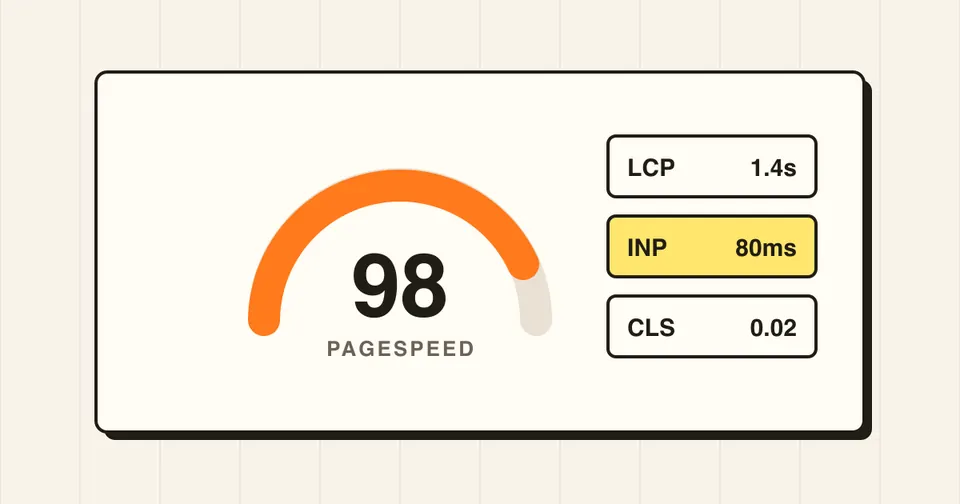
A slow WordPress site loses visitors and rankings. Google measures real-user speed through Core Web Vitals, and those scores feed into search results. This guide covers the changes that make the biggest difference, in the order I apply them on client sites.
1. Know the three numbers that matter
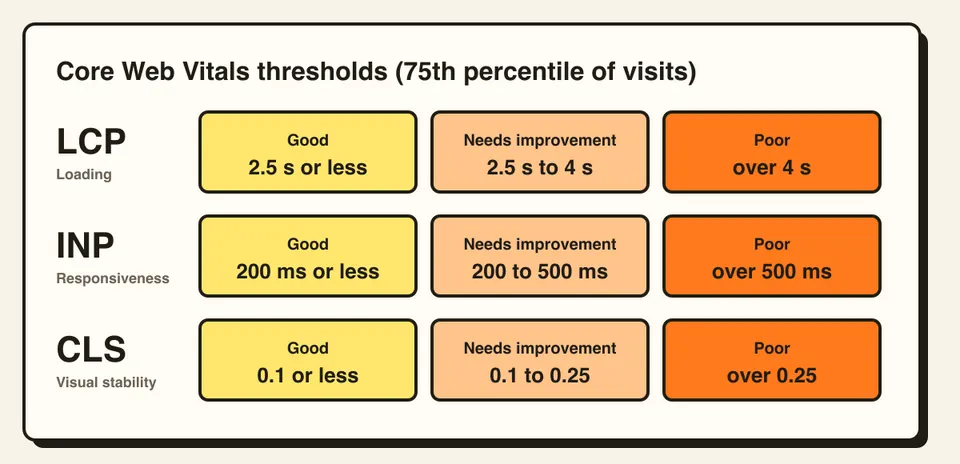
Google rates each metric as good, needs improvement or poor, based on the 75th percentile of real visits (split by mobile and desktop). The "good" thresholds are:
- LCP (Largest Contentful Paint): 2.5 seconds or less. How fast the main content, usually the hero image or headline, appears.
- INP (Interaction to Next Paint): 200 milliseconds or less. How quickly the page responds after a tap or click.
- CLS (Cumulative Layout Shift): 0.1 or less. How much the layout jumps while loading.
Test with PageSpeed Insights and check the field data at the top of the report. That is real-user data. The lab score below it is only a simulation.
2. Start with hosting and PHP
No plugin can fix a slow server. If your time to first byte is above roughly 600 ms, look at hosting first. Use a host that runs a current PHP version (WordPress recommends PHP 8.3 or newer), offers server-level caching and gives you enough memory. Shared hosting that is oversold is the most common hidden cause of slow WordPress sites.
3. Add proper caching
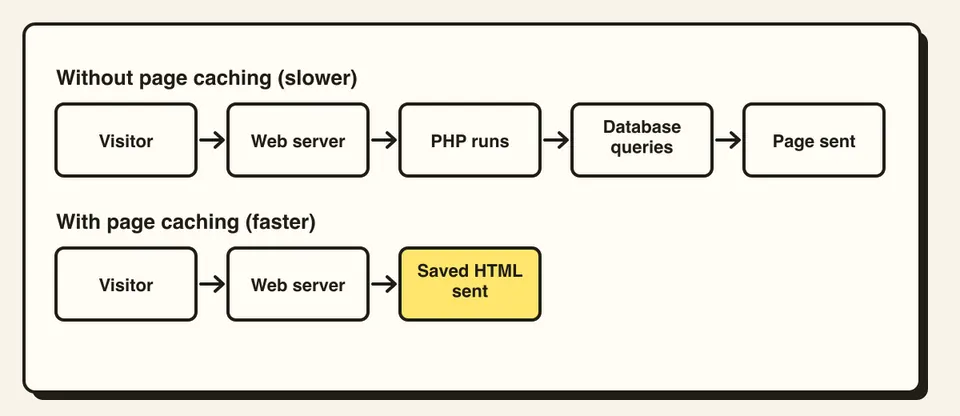
By default, WordPress builds each page with PHP and database queries on every visit. Page caching saves the finished HTML and serves it instantly.
Use one caching solution, not several. Your host's built-in cache, or a single well-configured plugin such as WP Rocket or LiteSpeed Cache, is enough. Add a CDN such as Cloudflare so files load from a server near the visitor.
4. Fix your images (the biggest LCP win)
Images are usually the heaviest part of a page. In order of impact:
- Serve WebP or AVIF instead of PNG and JPG.
- Resize to the display size. A 4000px photo shown at 800px wastes bandwidth.
- Do not lazy-load the hero image. Lazy-load everything below the fold.
-
Set
widthandheighton every image so the layout does not jump (this also fixes CLS). - Preload the hero image so the browser fetches it early.
5. Remove plugin and theme bloat
Every active plugin can add CSS, JavaScript and database queries. Audit them:
- Delete plugins you do not use. Deactivated ones still count as risk.
- Replace heavy plugins with lighter ones, or with a few lines of code.
- Disable scripts on pages that do not need them, for example contact form scripts on blog posts.
- Choose a lean theme. Multipurpose themes that bundle many page-builder widgets often load far more code than a page uses.
6. Reduce render-blocking CSS and JavaScript
Minify and combine files only if testing shows a gain, since HTTP/2 already handles many small files well. The bigger wins are deferring non-critical JavaScript, loading critical CSS first, and delaying third-party scripts (chat widgets, ad tags, analytics) until after the first interaction. Third-party scripts are a common cause of poor INP.
7. Self-host and trim fonts
Load fonts from your own server, use WOFF2, and limit yourself to two families and a
few weights. Add
font-display: swap
so text shows immediately, and preload the main font file.
8. Keep the database clean
Old post revisions, expired transients and leftover plugin tables slow queries over time. Limit revisions, clear transients, and remove tables from plugins you uninstalled. Take a backup first.
9. Test after every change
Change one thing, then measure again. Optimization plugins can break layouts or forms, so test on a staging copy before pushing to the live site. Check mobile, since most Core Web Vitals problems show up there.
Quick checklist
- Supported PHP version (8.3 or newer) and decent hosting
- One page-caching setup and a CDN
- WebP images with sizes set, hero image not lazy-loaded
- Unused plugins removed
- Third-party scripts delayed
- Fonts self-hosted and trimmed
- Results checked on mobile
Frequently asked questions
Aim for an LCP under 2.5 seconds on mobile for most visitors. A fully loaded time under 3 seconds is a good practical target.
Yes. Core Web Vitals are part of Google's page experience signals. Speed will not beat relevant content, but between two similar pages the faster one has the edge, and faster pages also convert better.
Steps 3 to 5 are doable for most site owners. Server tuning, script deferral and database cleanup are safer with a developer, because mistakes can break the site.