Security Risks in AI-Generated WordPress Code (and How to Fix Them)
By Imran Hosain · · 8 min read
AI assistants write WordPress code fast, but they do not always write it safely. A snippet can work perfectly and still leave your site open to attack. This guide covers the most common security gaps I look for when reviewing AI-generated WordPress and Shopify code, and how to fix them. It is for site owners and developers who use AI to build.
The core rule: never trust data
The official WordPress developer guidance puts it simply: do not trust any data, including user input, third-party APIs and even database contents. Validate and sanitize input, and escape output. AI-generated code often skips one of these.
1. Missing sanitization and validation (input)
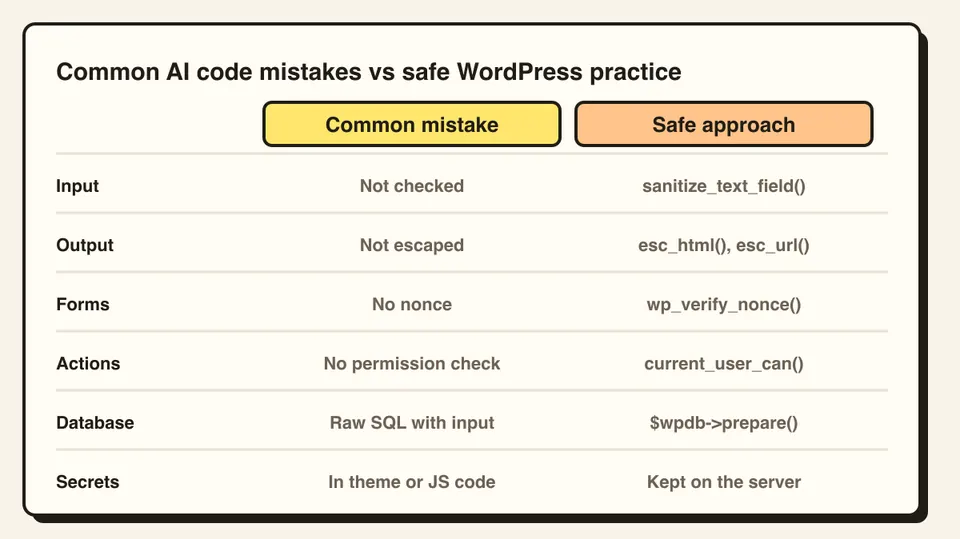
When code takes data from a form, URL or request, it must be checked before use.
Validate that the value is what you expect (a number, an email, one of a fixed list),
and sanitize it with a WordPress function such as
sanitize_text_field()
or
sanitize_email().
Rejecting bad input is better than quietly cleaning it.
2. Missing escaping (output)
Anything printed to the page must be escaped at the moment it is output. WordPress
recommends escaping late, as close to the
echo as possible.
Use esc_html() for
text,
esc_attr() for
attribute values,
esc_url() for
links, and
wp_kses_post()
when you must allow safe HTML. Missing escaping can lead to cross-site scripting
(XSS).
3. Forms without nonces
A nonce is a one-time token that proves a request came from your own page. Without
one, an attacker can trick a logged-in user into submitting an action they did not
intend (CSRF). Add a nonce to forms and AJAX requests, and verify it on the server
with functions such as
wp_verify_nonce()
or
check_admin_referer().
4. No permission checks
A button hidden in the admin is not security. The code that performs the action must
check that the current user is allowed to do it, for example with
current_user_can( 'manage_options' ). AI examples often leave this out.
5. Unsafe database queries
Never put user input straight into an SQL string. Use
$wpdb->prepare()
so values are handled safely, or use WordPress functions such as
WP_Query that
handle this for you. Unprepared queries can allow SQL injection.
6. Secrets in the wrong place
Passwords, API keys and tokens should never be written into theme files, public
repositories or front-end JavaScript, because visitors can read them. Keep secrets on
the server, for example in
wp-config.php or
environment settings. On Shopify, keep Admin API access tokens on a server, never in
theme code or browser scripts, since they grant access to store data.
7. Invented, outdated or unnecessary code
AI sometimes uses functions that do not exist, were deprecated, or came from old tutorials. It can also add extra plugins or libraries for a small job. Every addition is more code to maintain and secure. Check that each function exists in the current WordPress documentation, and remove anything you do not need.
8. Untested updates and no backups
Even secure code needs updates to WordPress, themes and plugins. Test changes on a staging copy and keep tested, off-site backups so you can recover quickly. If a site is ever compromised, see my recovery guide.
A quick review checklist
- Is every input validated and sanitized?
- Is every output escaped where it is printed?
- Do forms and AJAX calls use and verify nonces?
- Do actions check user capabilities?
- Are database queries prepared?
- Are there any secrets in front-end or theme code?
- Do all functions exist in current documentation?
- Was it tested on staging, with backups in place?
Use AI, but verify
AI is a great assistant for writing code. It is not a security reviewer. Treat its output as a draft: read it, test it, and have an experienced developer review anything that touches payments, logins or customer data.
Frequently asked questions
Not by default. It may work but skip sanitization, escaping, nonces or permission checks. Review and test it before using it on a live site.
Sanitizing cleans input data when it comes in. Escaping makes data safe at the moment it is printed to the page. You need both.
No. Use it as an assistant and verify its output. Have an experienced developer review code that handles payments, logins or customer data.