Custom WordPress Theme vs Ready-Made Theme: Which Should You Choose?
By Imran Hosain · · 6 min read
When building a WordPress site, one early decision affects cost, speed and flexibility for years: buy a ready-made theme, or have a custom one built? I build both marketplace themes and custom client sites, so here is a balanced view.
What is a ready-made theme?
A ready-made theme is sold or distributed on a marketplace such as ThemeForest, or on the WordPress theme directory. It comes with demo layouts, options panels and often page-builder support. You install it and adjust the content.
What is a custom theme?
A custom theme is built for one site. A developer creates the templates, styles and features around your design and content, and includes only what you need.
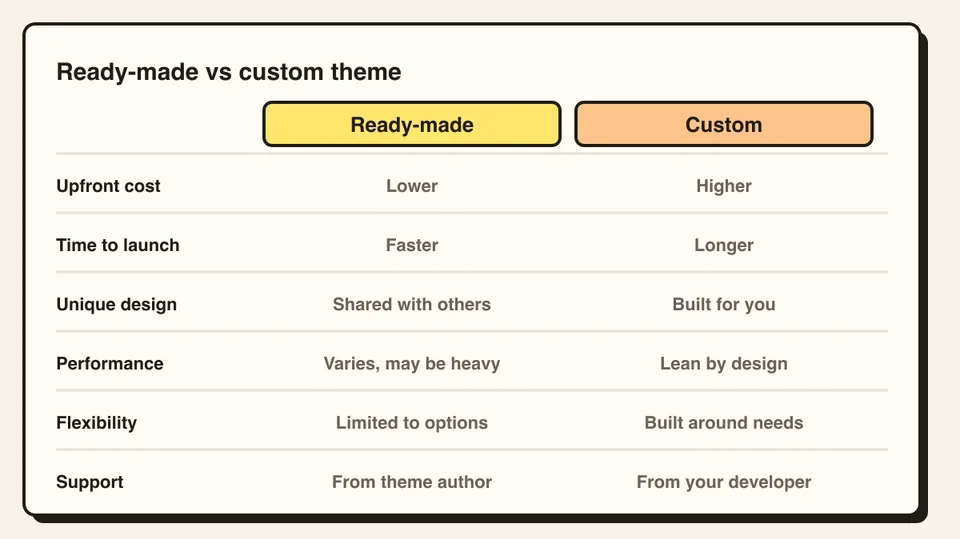
Ready-made themes: pros and cons
Pros
- Lower upfront cost
- Quick to launch, since layouts already exist
- You can preview the demo before buying
Cons
- Many bundle features you will never use, which can slow the site
- Your site may look like others using the same theme
- Customizing beyond the options can be awkward
- You depend on the theme author for updates and support
- Heavy page-builder use can lock you in
Custom themes: pros and cons
Pros
- Design and features fit your business
- Lean code, which helps speed and Core Web Vitals
- Easier to extend in the way you need
- No unused features to maintain
Cons
- Higher upfront cost
- Takes longer to build
- You need a developer for deeper changes
A middle path
You do not have to choose one extreme. A lightweight starter theme with custom blocks and templates gives a unique design without building everything from zero. WordPress block themes also let you edit templates in the Site Editor, which reduces the need for code for many changes.
How to decide
- Pick a ready-made theme if the budget is tight, the site is simple, and a good demo already matches what you need.
- Pick a custom theme if brand identity matters, performance is a priority, you need unusual features, or the site is central to your business.
If you are buying a theme, look at the update history, support responsiveness, reviews, and test the demo's speed with PageSpeed Insights. Avoid "nulled" copies, which often carry malware. For a custom build, ask to see live projects and how the developer works.
Frequently asked questions
It is worth it when brand, performance or unusual features matter, or when the site is central to your business. For simple sites, a good ready-made theme can be enough.
Not always, but many bundle features you do not use. Test the demo with PageSpeed Insights before buying.
Yes. Many sites do, but moving content and design later takes work, so decide with your long-term plans in mind.